

Flows
Trigger Quotient flows from your application with the JavaScript SDK.
Overview
Quotient's built-in triggers cover most of the moments you would want to start a flow: event triggers, schedule triggers, person-created triggers, and so on. Sometimes, though, the trigger lives entirely inside your product. Your backend might be the only thing that knows when a user has finished your signup wizard, when a customer has cancelled through your billing page, or when someone has crossed a usage threshold that only your database tracks.
A programmatic flow bridges that gap. You build the flow in Quotient as usual,
set its trigger type to Programmatic, and then call flow.trigger() from
your application whenever the event you care about happens.
| Endpoint | API Key | Server SDK | Client SDK |
|---|---|---|---|
| Trigger flow | public or private | flow.trigger() | flow.trigger() |
Common use cases include:
- Welcome series on signup. Start a sequence of onboarding emails immediately after a user finishes signing up.
- Win-back on cancellation. Queue up a win-back sequence when a customer cancels their subscription.
- Pricing events. Fire a flow when something pricing-significant happens to a customer — e.g., their free trial lapses, their card declines, or they upgrade to a paid plan. We use this one ourselves for our own reverse-free-trial flow.
- Usage milestone. Send a congratulatory email when a customer crosses a meaningful threshold in your product, like their 100th order or 10,000th email.
- Internal notification. Notify your sales or support team when a specific in-product event fires.
Set up a Programmatic Flow
Build your flow as you normally would. The emails, branches, and timing are no different from any other flow. The only thing you need to change is the trigger. Open the flow's trigger settings and set the type to Programmatic.
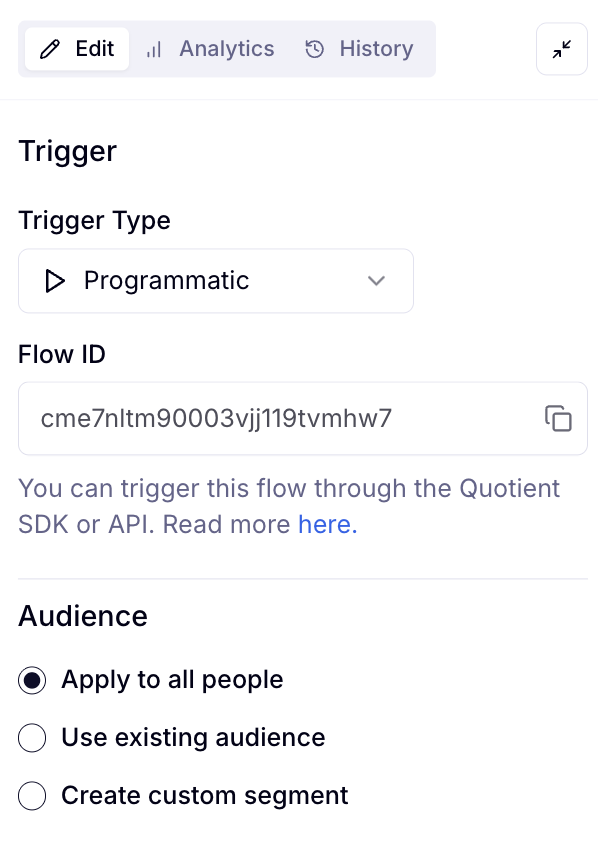
You can also restrict the trigger to a specific segment, just like with
scheduled triggers. If your code calls flow.trigger() for someone who does
not match the segment, Quotient will not enroll them. For example, a "welcome
to the Pro plan" flow with a paid-customer segment restriction will not fire
for a free-tier user, even if your code calls it with one.
Trigger a Flow
flow.trigger(options)
POST /api/v0/flow/{flowId}/triggerAuth: public or private key · scope:
FLOW_TRIGGER
| Param | Type | Required | Description |
|---|---|---|---|
flowId | string | Yes | The flow ID to trigger |
personId | string | Yes | The person to enroll in the flow |
const result = await client.flow.trigger({
  flowId: "YOUR-FLOW-ID",
  personId: "PERSON-ID",
});
Returns:
{
  success: boolean;
}
Quotient enrolls the given person in the flow and starts the first step. The call returns as soon as enrollment is confirmed. It does not wait for the flow to finish running, which could take hours or days depending on how it is configured.
Server Side Example
import { QuotientServer } from "@quotientjs/server";

const quotient = new QuotientServer({
  privateKey: process.env.QUOTIENT_PRIVATE_KEY!,
});

await quotient.flow.trigger({
  flowId: "YOUR-FLOW-ID",
  personId: "PERSON-ID",
});
Client Side Example
import { QuotientClient } from "@quotientjs/client";

const quotient = await QuotientClient.init({
  apiKey: process.env.NEXT_PUBLIC_QUOTIENT_PUBLIC_KEY!,
});

await quotient.flow.trigger({
  flowId: "YOUR-FLOW-ID",
  personId: "PERSON-ID",
});
Anything running in the browser is visible to users and can be called by anyone who inspects your code. Do not use client-side triggering for flows that should not be fired arbitrarily, like a flow that notifies your sales team. Trigger those from your backend instead.
Worked Example: Signup Welcome Flow
To make this concrete, here is how you might wire up a welcome flow that fires
when a new user finishes signup. The pattern is: upsert the person in
Quotient so you have a stable personId, then trigger the flow.
import { QuotientServer } from "@quotientjs/server";

const quotient = new QuotientServer({
  privateKey: process.env.QUOTIENT_PRIVATE_KEY!,
});

export async function onUserSignedUp(user: {
  email: string;
  firstName: string;
  lastName: string;
}) {
  const { personId } = await quotient.audience.people.upsert({
    emailAddress: user.email,
    firstName: user.firstName,
    lastName: user.lastName,
    emailSubscriptionStatus: "SUBSCRIBED",
  });

  await quotient.flow.trigger({
    flowId: process.env.SIGNUP_FLOW_ID!,
    personId,
  });
}
The flow itself lives entirely in Quotient. Your code only decides when to fire it. The content is edited in Quotient and can change without a deploy.
If the trigger call fails due to a transient network error, the person will not be enrolled. If you are triggering from a web request handler, consider offloading the call to a background job system like Inngest, Temporal, or a queue so it can be retried independently of the HTTP response.
Why not just use the Person Created trigger?
If you wanted a flow to fire whenever someone enters your audience, you could skip the SDK entirely and configure the flow with a Person Created trigger in the Quotient UI. That works great for "anyone who lands in the list, anywhere, for any reason."
The reason to reach for flow.trigger() instead is when the flow shouldn't
fire every time. In the welcome example above, the same audience.people.upsert()
call gets made in lots of places — a contact form, a newsletter signup, a
lead-magnet download — and you probably don't want a brand-new user to
receive the welcome series simply because someone typed their email into a
landing page form. Routing flow enrollment through your own backend lets
you decide which upsert paths count as a signup and which don't.
Finding the IDs
flow.trigger() needs two IDs: the flow you are triggering and the person you
are enrolling.
Flow ID. Open the flow in Quotient. The ID is in the URL. Treat it like any other configuration value. Hardcoding is fine for a single well-known flow, but most teams store it in an environment variable so staging and production can point to different flows.
Person ID. This is the ID that Quotient assigns when a person enters your
marketing system. You will typically get it from
audience.people.upsert(), which accepts an email address and returns a
personId. Once you have it, you can store it on your user record and reuse
it across subsequent trigger calls.
Scopes
| Scope | Required for |
|---|---|
FLOW_TRIGGER | flow.trigger() |